
How to write a payment reminder email that gets you paid (with templates)
 Researched and Written by
  Reviewed and Edited by
 Do you frequently chase customers to settle their outstanding invoices? You send the overdue payment reminder email and wait for their response. Days turn into weeks, and you still do not see any signs of cash flowing into your account. Spending an excessive amount of time running after clients – that’s one of the top mistakes many business owners make.
Repeatedly emailing customers can be awkward, but you need that sum for the services rendered and to maintain a healthy cash flow to run your business successfully. The keys to an effective invoice reminder email lie in its execution. It should balance professionalism, clarity, and make a customer feel that you are serious about business.
This blog dives deep into some of the most common questions asked by many business owners: ‘How do I professionally remind someone to pay me?’ You will learn about the psychology of collection email strategies, key components of effective messaging, and ready-to-use payment reminder email templates for every stage of delinquency.
The psychology behind successful collections emails
Before you even draft an email, take a brief moment to understand why your customers are delaying payments. A majority of late payment cases are not malicious, meaning they do not intend to hurt your business in any way. It could be that your client gets busy attending to their clients, internal approvals get stuck with someone who is currently out of the office, or your payment follow-up email gets lost among other unread emails.
There are many other reasons that stall the process, delaying cash flow into your business. You will likely feel frustrated and anxious, but it is important to stay composed and approach such situations with empathy rather than aggression. Your goal is to remove barriers hindering revenue flow by maintaining an open communication channel.
Treating payment tracking as a standard business process over emotional confrontation is a key step in building a well-managed AR workflow. When you structure your invoice reminder email sequences with systematic regularity, clients understand that your credit terms are firm. Consistency builds respect, and clear guidelines minimize administrative friction.
Key components of a successful payment reminder email
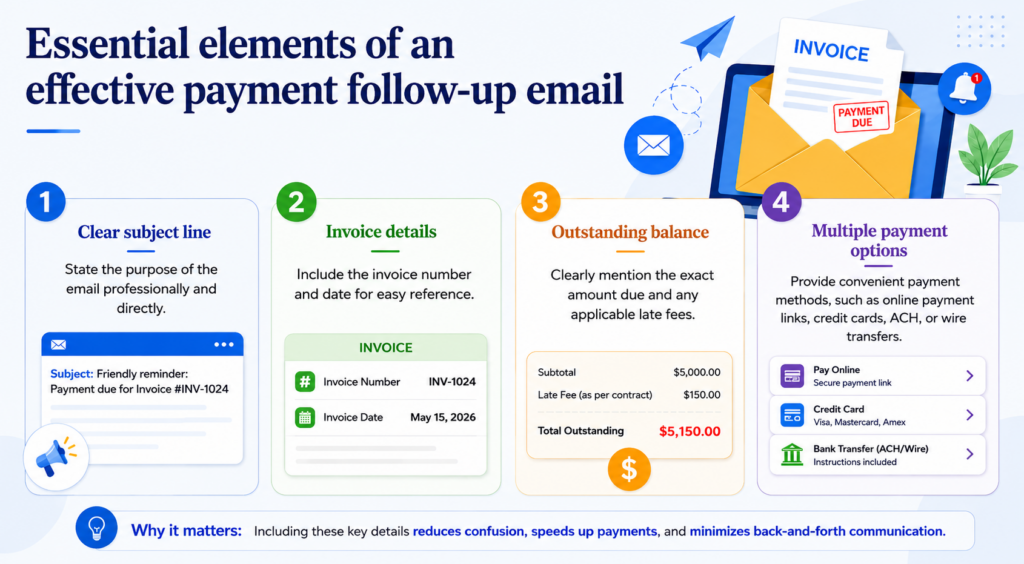
What are the essential elements of an effective payment follow-up email?
Ever wondered how high-converting payment follow-up emails are written? You will find that every email shares a core set of elements. If you miss one or more of these components, the outreach’s effectiveness may be reduced, resulting in additional back-and-forth communication.
- A clear subject line: State why you are reaching out, without getting aggressive.
- The exact invoice number and date: Let your customers know these details upfront so they do not have to search for them.
- The total outstanding amount: State the exact amount owed clearly. If there are late fees calculated according to your contract, detail them explicitly.
- Multiple payment methods: Make the transaction frictionless by embedding direct links to online payment gateways, adding credit card choices, or outlining clear bank transfer details like ACH or wire instructions.
How do I structure my sequence based on the timeline?
Timing alters the tone of your communication. A first outreach should feel like a courteous check-in, whereas a severely overdue payment reminder email needs a direct, uncompromising tone. Let us review the best practices across standard US invoicing cycles.
3 to 5 days overdue
In the US, it is standard practice to allow a brief grace period after the due date passes before sending your first invoice reminder email. This note acts as a helpful nudge, assuming the client simply overlooked the date or the invoice is currently sitting in a processing queue.
7 to 10 days overdue
If more than a week passes without payment or a status update, it is time to shift your tone to a direct inquiry. Use a formal payment reminder email template to request an explicit timeline for when the transaction will be processed by their accounts payable department.
15+ days overdue
At the two-week mark, unpaid work can significantly impact your cash flow. Your payment collection email must outline the consecutive steps your company will take if the debt remains unpaid, including late fees, suspension of ongoing services, or potential legal reviews.
Ready-to-use templates for your collections workflow
Below are customizable options tailored for various milestones. Fill in the bracketed variables to streamline your manual or automated communication pipeline.
Template 1: Gentle payment reminder email (3-5 days past due)
Subject: Follow-up on invoice (Invoice Number) for (Your Company Name)
Dear (Client Name),
I hope you are having a productive week.
This is a quick note to let you know that invoice (Invoice Number), issued on (Issue Date), has passed its due date of (Due Date). The outstanding balance is (Amount).
We understand things get busy, so we wanted to bring this to your attention in case the invoice was misrouted. For your convenience, you can complete the payment directly via our secure payment gateways by clicking here: (Link). Alternatively, banking details remain the same as listed on the invoice documentation for ACH payments.
Please let us know if you need us to resend the original paperwork or if you have any questions.
Best regards,
(Your Name)
(Your Company Name)
Template 2: Invoice reminder email (7-10 days past due)
Subject: Past due notice: Invoice (Invoice Number) for (Your Company Name)
Dear (Client Name),
We hope this message finds you well.
Our records show that we have not yet received payment or an update for invoice (Invoice Number) for the amount of (Amount), which was due on (Due Date).
If you have already initiated an ACH or wire transfer, please feel free to disregard this note. Otherwise, please use the payment link below or confirm an estimated processing date with your accounts payable team so we can update our records.
(Link to Payment Portal)
Thank you for your prompt attention to this matter.
Sincerely,
(Your Name)
(Your Company Name)
Template 3: Overdue payment reminder email (15+ days past due)
Subject: Urgent action required: Invoice (Invoice Number) is 15 days overdue
Dear (Client Name),
Despite previous outreach efforts, invoice (Invoice Number) for (Amount) remains unpaid. This invoice is now 15 days past its original due date.
Please be advised that further delays may result in the application of contractual late fees and the immediate suspension of active services. We value our partnership and want to avoid taking these administrative steps.
Please process the full payment immediately using this link: (Link). If your company is experiencing temporary financial constraints, please contact me directly today so we can discuss an alternative payment arrangement.
Your immediate attention is required.
Respectfully,
(Your Name)
(Your Company Name)
How a custom promotional manufacturer reclaimed 20 hours a month
A compelling case study from a US East Coast printing and manufacturing company highlights the risk of delayed outreach. The business, which creates custom promotional products for major corporate clients, had 10% of its invoices running over 90 days past due. Because their lone manager only had the bandwidth to reach out manually after 30 days, several early windows were missed. By implementing an automated system that initiates multi-channel follow-ups right on day one past due, the company successfully protected its repeat-buyer relationships, eliminated the need for third-party collection agencies, and saved 20 hours of manual labor every single month.
Collect overdue payments faster with our AI AR Collections Specialist
Squirrels.ai offers an AI AR Collections Specialist to completely transform how American businesses handle outstanding debt. Our AI agent seamlessly integrates into your existing workflows, automatically calling, emailing, and texting your customers to remind them of overdue invoices, helping you recover revenue faster with zero manual effort.
The way our AI AR agent works is simple. You begin by signing up, hiring the AI AR collections agent, and setting up your customized collections playbook. Once configured, you set your strategic goal to remind pending payments and easily upload your aging list or sync the data directly from your accounting software. Next, you customize your outreach campaign by configuring the email, SMS, and phone call sequences. Finally, you launch the mission. You can track real-time status updates and review payment outcomes, such as promised to pay, disputed, etc, on our dashboard.
Here are the key features of our AI AR collections specialist:
- Payment reminder emails: Summarizes outstanding balances with due dates & instructions. Sends courteous follow-up emails escalating in tone if needed.
- Context-driven calls: Reminds overdue invoices, referencing previous emails. Engages in context-aware conversation to encourage immediate payment commitments.
- Engages via texts: Sends quick payment reminders. Manages replies, provides payment links, and confirms actions taken.
Book a demo to learn more about how you can collect outstanding payments faster with zero manual effort.
Frequently Asked Questions (FAQs)
Assume the oversight was unintentional, attach a duplicate copy of the bill to prevent administrative delays, and offer direct links to secure online payment gateways. Clear, helpful instructions always ensure a smooth transaction while preserving goodwill.
In the US, businesses typically skip pre-due date reminders and allow a brief grace period first. Send your first gentle notification three to five days after the due date. Follow up with a formal check-in on the 10th day past due, and escalate to a critical collection message after more than two weeks have passed.
An effective note must explicitly include the unique invoice number, original issuance date, and the total balance due. Additionally, always mention immediate payment options like ACH routing info or secure online billing links alongside an easily accessible PDF attachment of the original billing statement.
To write an overdue notice, state the past-due status of the invoice right away in a clear, concise manner. Maintain an uncompromised, objective tone, outline any relevant late fees calculated per your contract, and state the consecutive steps your firm will take if the balance remains unpaid.
The best subject line clearly states the core purpose of the communication without sounding confrontational. Include your company name, the exact invoice tracking number, and the specific days past due.
Your outreach tone should evolve depending on how long the debt has been outstanding. Begin with a courteous, helpful check-in for accounts that are just a few days past due. Then, shift to a firm, urgent, and uncompromising tone as the balance crosses the fifteen-day threshold.
Write a polite, clear payment request email with the invoice number, due date, payment details, and a simple request for prompt payment.